
WordPress Content Automation & SEO Plugins: Rank Posts Top 10 in 30 Days
You’ve published a dozen posts. You’ve installed something called an SEO plugin. You wait. Nothing moves past page 4. Sound familiar? Here’s what most WordPress guides won’t tell you: the plugin alone isn’t the problem — it’s that most sites are treating SEO plugins like a checklist tool instead of the engine of a fully automated content system.
The difference between sites that crack the top 10 in 30 days and those that stagnate for months? They combine WordPress content automation & SEO plugins into a connected pipeline — not just individual tools firing independently. This article shows you exactly how to build that pipeline, step by step.
Why Content Automation Outperforms Manual SEO in 2025
Here’s the counterintuitive truth: Google doesn’t reward effort. It rewards signals — freshness, topical depth, internal link equity, structured data. You can work 60-hour weeks writing posts manually and still lose to a site that publishes three well-structured, AI-assisted articles per week on a consistent schedule.
According to W3Techs, WordPress powers over 43% of all websites on the internet. That’s an enormous competitive field. The sites breaking through in 2025 aren’t the ones grinding out posts by hand — they’re the ones that figured out how to automate the repeatable parts of SEO without sacrificing quality.
What most people miss is that search rankings are largely a game of topical authority. Google wants to see that your site covers a subject area deeply, not just one viral article. That means you need volume, structure, and consistency — three things automation handles better than any human workflow.
The practical takeaway? Stop trying to write your way to the top manually. Build a system. That system starts with choosing the right WordPress content automation & SEO plugins stack and connecting it to an automation layer that handles what’s too slow to do by hand.
Want a deeper look at how AI-driven workflows fit into this strategy? The Complete Guide to AI-Powered SEO Content Strategy in 2026 covers content velocity optimization and scaling organic traffic with real workflow examples.
Best WordPress SEO Plugins Compared
Choosing the wrong SEO plugin is like picking the wrong foundation for a house — everything built on top of it suffers. Here’s an honest comparison of the top options in the WordPress ecosystem right now.
| Plugin | Best For | Schema Support | AI Integration | Price |
|---|---|---|---|---|
| Rank Math | Advanced users, automation | ✅ Extensive (27+ types) | ✅ Built-in Content AI | Free / $6.99/mo |
| Yoast SEO | Beginners, content writers | ✅ Good (structured data) | ⚠️ Limited (Premium) | Free / $99/yr |
| All in One SEO | WooCommerce, local SEO | ✅ Good | ⚠️ Emerging | Free / $49.60/yr |
| SEOPress | Agencies, white-label | ✅ Good | ❌ Minimal | Free / $49/yr |
| Authenova Plugin | Full AI content automation | ✅ Auto-injected | ✅ Full AI pipeline | Free trial available |
For most WordPress site owners running a content-focused strategy, Rank Math is the strongest starting point among traditional SEO plugins. Its schema support is unmatched in the free tier, the REST API integration plays nicely with automation tools, and the Content AI feature gives you keyword suggestions inside the editor.
If you want a thorough walkthrough of Rank Math’s settings, this Complete Rank Math Tutorial covers every configuration option in detail. For a broader view of the ecosystem, Search Engine Journal’s roundup of the best WordPress SEO plugins is worth bookmarking.
That said — and this is where it gets interesting — no single SEO plugin will rank your content automatically. They optimize what you’ve already written. The real unlock comes when you pair them with a content generation layer.
How the Authenova WordPress Plugin Automates Your SEO Pipeline
Most “automation” tools for WordPress are glorified schedulers — they’ll post at a specific time, but you still write everything yourself. The Authenova WordPress Plugin does something fundamentally different.
Here’s what it actually does when you install it: the plugin connects your WordPress site to the Authenova platform in a single step. It immediately syncs your site’s existing structure — pages, categories, tags, metadata, sitemaps, even WooCommerce products if you have them. Then it runs in reverse: AI-generated content from the platform gets pushed back to WordPress and published automatically, fully loaded with schema markup, meta tags, proper categorization, internal links, and sitemap updates.
You’re not copying and pasting from an AI tool into your editor. The pipeline is closed — strategy in, published posts out.
What Gets Automated (Specifically)
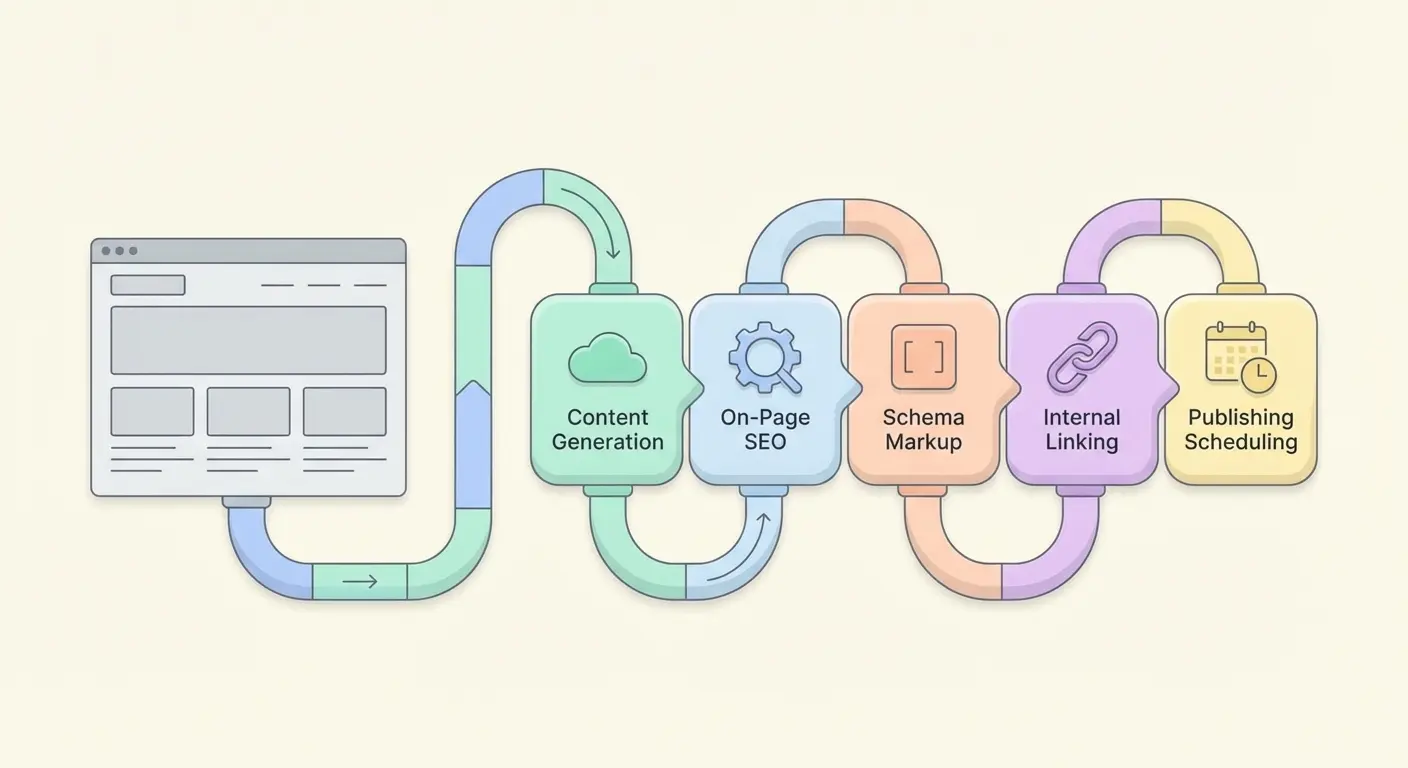
- Content generation: AI writes topically structured articles targeting your chosen keywords
- On-page SEO: Title tags, meta descriptions, focus keywords, and heading structure are set automatically
- Schema markup: Article, FAQ, HowTo, and other relevant schema types are injected per post
- Internal linking: New posts are linked to existing relevant content based on semantic relationships
- Sitemap updates: Your XML sitemap refreshes with every new publish, signaling Google to crawl
- Pillar-cluster structure: Content is organized into topical clusters automatically, building authority
This matters because the bottleneck for most WordPress SEO efforts isn’t knowing what to do — it’s the time it takes to do it consistently. One well-configured Authenova setup can maintain a publishing schedule that would require a full content team to replicate manually.
Fair warning: the platform works best when you’ve defined a clear topical focus. Feeding it a well-researched keyword list and a content strategy framework (like the pillar-cluster architecture explained here) dramatically improves output quality.
The 30-Day Ranking Plan: Step-by-Step
This isn’t a generic “publish good content” plan. These are the specific actions that move posts from page 5 to the top 10, based on how Google’s ranking signals actually work.
Week 1: Infrastructure Setup
- Install and configure Rank Math — Set up Google Search Console integration, enable breadcrumbs, activate the Schema module, and configure default OG tags. Takes about 45 minutes if you follow the Rank Math tutorial linked above.
- Audit your existing content — Use Rank Math’s Content AI or a free tool like Google Search Console to identify posts that are ranking on pages 2-3. These are your fastest wins — a targeted update can push them to page 1 within days, not months.
- Connect Authenova — Install the plugin, activate, and sync your site. This gives the platform your existing content map so it can build around what you already have.
- Define your keyword clusters — Pick 3-5 topic areas you want to own. For each, identify one pillar keyword and 5-8 supporting long-tail variants. (Need help finding low-competition targets? The long-tail keyword strategy guide covers this exact process.)
Week 2: Content Creation at Scale
- Publish your pillar page — This is the hub document for each topic cluster. It should be 2,000+ words, internally link to all supporting articles (even placeholders), and use structured headers that match common search queries.
- Queue 8-10 supporting articles via Authenova — Set the platform to generate and publish 2-3 per day. These target your long-tail keyword variants and each one links back to the pillar.
- Submit to Google Search Console — After each publish, use the URL Inspection tool to request indexing. Don’t wait for Googlebot to find them.
Week 3: Optimization and Internal Linking
- Update older posts with internal links to your new content. Internal link equity flows both ways — new posts benefit from established pages, and the cluster boosts the pillar’s authority.
- Add FAQ schema to high-priority posts — FAQ-rich results appear above standard organic listings in many queries. Rank Math makes this a 5-minute job per post.
- Check Search Console for impressions — By day 18-21, new posts should start showing impressions. Filter by “Position” to find any that are ranking 11-20 — these need targeted internal links and possible content expansion.
Week 4: Compounding the Gains
- Identify which cluster articles drove the most impressions and expand them. Add a comparison table, a step-by-step section, or an FAQ block — whatever matches the search intent most users demonstrated.
- Set up automated publishing going forward — One week of manual effort followed by continuous automation is the compounding model. Let Authenova maintain 3-5 posts per week while you focus on strategy.
☐ Rank Math configured with Search Console
☐ Authenova plugin installed and site synced
☐ 1 pillar page published per topic cluster
☐ 8–10 supporting posts published (2-3/day)
☐ Internal links added to existing content
☐ FAQ schema on top 5 posts
☐ URL inspection submitted for all new posts
☐ Week 3 impression data reviewed
☐ Top-performing posts expanded
☐ Ongoing automation schedule set
Building Your WordPress Automation Stack
The most effective WordPress automation setups layer multiple tools — each handling a specific part of the pipeline without overlapping. When your WordPress content automation & SEO plugins work in concert, the whole system compounds rather than just adding up.
The Core Stack
- Content generation + publishing: Authenova (covers AI writing, SEO metadata, schema, internal linking, sitemap)
- On-page SEO analysis: Rank Math (keyword scoring, readability, schema builder for custom posts)
- Workflow automation: Uncanny Automator (trigger-based actions — e.g., notify Slack when a post publishes, auto-add posts to email campaigns)
- Performance tracking: Google Search Console + Rank Math’s Analytics dashboard
One thing worth calling out: you don’t need every automation tool available. More plugins mean more potential conflicts, slower load times, and more maintenance. The principle is to automate the highest-frequency, most repetitive tasks first — and content publishing is at the top of that list.
A Note on Content Quality
AI-generated content has a reputation problem that’s mostly outdated. The quality ceiling has moved dramatically in the past 18 months. That said, automation doesn’t mean zero human involvement — it means reducing the human time-per-post from 4 hours to 20 minutes. Review, refine, and add your first-hand experience where it adds real value. Google’s E-E-A-T guidelines specifically reward content that demonstrates genuine experience — so a paragraph of real insight goes a long way on an otherwise automated post.
For context on what a production-quality AI content workflow actually looks like at scale, check out SitesOrbit’s free AI article generator demo — it shows the realistic output quality you can expect before committing to a paid platform.
Frequently Asked Questions
Can WordPress content automation actually rank posts in 30 days?
Yes — but the timeline depends on your domain’s existing authority and the competitiveness of your target keywords. New domains typically need 60–90 days for Google trust to build. However, sites with any existing authority (DR 20+) targeting long-tail keywords (under 1,000 monthly searches) regularly see top-10 results within 20–30 days when they combine consistent publishing velocity with proper on-page SEO through plugins like Rank Math.
What’s the difference between an SEO plugin and an SEO automation platform?
An SEO plugin (like Rank Math or Yoast) optimizes content you’ve already written — it handles meta tags, schema, readability analysis, and sitemap generation. An SEO automation platform like Authenova goes further by generating the content itself, building internal link structures, maintaining publishing schedules, and structuring topical clusters — essentially running the SEO strategy, not just executing individual optimizations.
Will Google penalize AI-generated WordPress content?
Google’s official stance since March 2024 is that AI-generated content is acceptable as long as it demonstrates E-E-A-T (Experience, Expertise, Authoritativeness, Trustworthiness) and serves the reader genuinely. The penalty risk comes from low-quality, thin content — not from AI authorship itself. Platforms like Authenova generate structured, topically relevant content that passes Google’s quality signals when combined with light human editing and real first-hand additions.
How many posts do I need to rank for a competitive keyword?
For competitive keywords (10,000+ monthly searches), you typically need a pillar page plus 8–15 supporting cluster articles that reinforce topical authority. For long-tail keywords under 1,000 monthly searches, a single well-optimized post with strong internal linking is often enough — especially when your site already covers the broader topic area with existing content.
Can I use Rank Math and Authenova together?
Yes. They work in complementary layers. Authenova handles content generation, publishing, and automated SEO metadata (title tags, descriptions, schema). Rank Math then lets you review and fine-tune that metadata inside the WordPress editor, run content analysis, and add custom schema types. There’s no plugin conflict — they serve different stages of the same workflow.
Ready to Put Your WordPress SEO on Autopilot?
If you’ve made it this far, you already know the strategy. The only question is whether you’re going to execute it manually — one post at a time — or build a system that does it for you.
Authenova connects to your WordPress site in one click, generates topically structured content, handles all on-page SEO automatically, and publishes on a schedule — no credit card required to start.
Want to go deeper on the strategy behind the stack? These resources fill in the gaps on WordPress content automation & SEO plugins:
- The Complete Guide to AI-Powered SEO Content Strategy in 2026 — full workflow methodology for automated content systems
- Long-Tail Keyword Strategy: The SEO Growth Engine Most Marketers Overlook — how to find the keywords that rank fastest
- Pillar-Cluster Content Architecture — structuring your site so every new post you publish makes all your other posts rank better