Automated WordPress Content Publishing: Publish 10x Posts in 7 Days
Most WordPress site owners write one post per week and wonder why organic traffic barely moves. Here’s the uncomfortable truth: publishing frequency is one of the strongest predictors of compounding SEO growth — and if you’re still doing everything manually, you’re leaving a massive traffic gap on the table.
Automated WordPress content publishing isn’t a shortcut. It’s a system. The right combination of plugins, AI workflows, and schema markup can take you from 4 posts a month to 40 — without sacrificing quality or burning out your team. This guide shows you exactly how to build that system and run a 7-day publishing sprint that actually moves the needle.
What Is Automated WordPress Content Publishing?
Automated WordPress content publishing is the process of generating, formatting, optimizing, and scheduling blog posts — with minimal or zero manual steps — using a combination of AI tools, APIs, and WordPress plugins.
This is different from “spinning” content or mass-producing thin articles. Done correctly, automation handles the infrastructure work — formatting, schema, internal linking, sitemap updates — while AI focuses on producing genuinely useful text based on your topic strategy.
What most people miss is that WordPress itself has a powerful REST API that third-party platforms, no-code tools like n8n and Zapier, and dedicated plugins can hook into directly. That API is the backbone of every real automation pipeline worth building.
Why Publishing Velocity Matters for SEO
Here’s where it gets interesting: Google doesn’t just reward high-quality individual posts. It rewards sites that signal ongoing authority in a topic area — and publishing frequency is a core signal of that authority.
A study of 900,000+ new web pages by Ahrefs found that 74% of new content now includes AI-generated text — which means the competitive bar for publishing volume has moved permanently. Sites that publish once a week are now competing against sites publishing daily.
This isn’t about flooding your site with garbage. The concept of content velocity as a compound SEO growth engine explains why consistent publishing creates cumulative ranking gains — each new post increases internal linking opportunities, topical depth signals, and crawl frequency.
Practically speaking: a site that publishes 10 well-structured posts in 7 days on related subtopics will often outperform a site with 1 deeply researched post on the same subject — because Google sees topical breadth, not just depth.
What most people miss: Publishing velocity only compounds when posts are topically clustered. Ten posts on unrelated subjects don’t help each other. Ten posts covering angles of the same core topic create a topical authority signal that boosts every post in the cluster.
Best Plugins for Automated WordPress SEO Publishing
Plugin choice determines how much of your automation pipeline you need to build yourself. Here’s an honest comparison of the major options:
| Plugin / Tool | Best For | Schema Support | AI Integration | Auto Publishing |
|---|---|---|---|---|
| Yoast SEO | Meta optimization, schema | ✅ Full structured data | Limited (content suggestions) | ❌ Manual only |
| WP Scheduled Posts | Scheduling & queue management | ❌ Relies on SEO plugin | ❌ | ✅ Full scheduling |
| Zapier + WordPress | Trigger-based publishing | ❌ | ✅ via OpenAI action | ✅ Event-triggered |
| n8n WordPress Node | Custom workflows, self-hosted | ✅ via custom fields | ✅ Full LLM integration | ✅ Full automation |
| Authenova Plugin | End-to-end SEO automation | ✅ Auto schema markup | ✅ Full AI pipeline | ✅ Full automation |
The honest take: most plugin combinations require you to stitch together 3-4 tools and manage them manually. That works if you have a developer on your team. If you don’t, you’ll spend more time maintaining the pipeline than publishing content.
For structured data specifically, Yoast’s structured data system is one of the most battle-tested in the WordPress ecosystem — it automatically generates Article, Breadcrumb, and WebPage schema for every post. That’s a solid foundation even if you automate content creation elsewhere.
AI Content Automation Workflow for WordPress
Building an AI content automation workflow for WordPress doesn’t require a computer science degree — but it does require thinking in systems, not tasks.
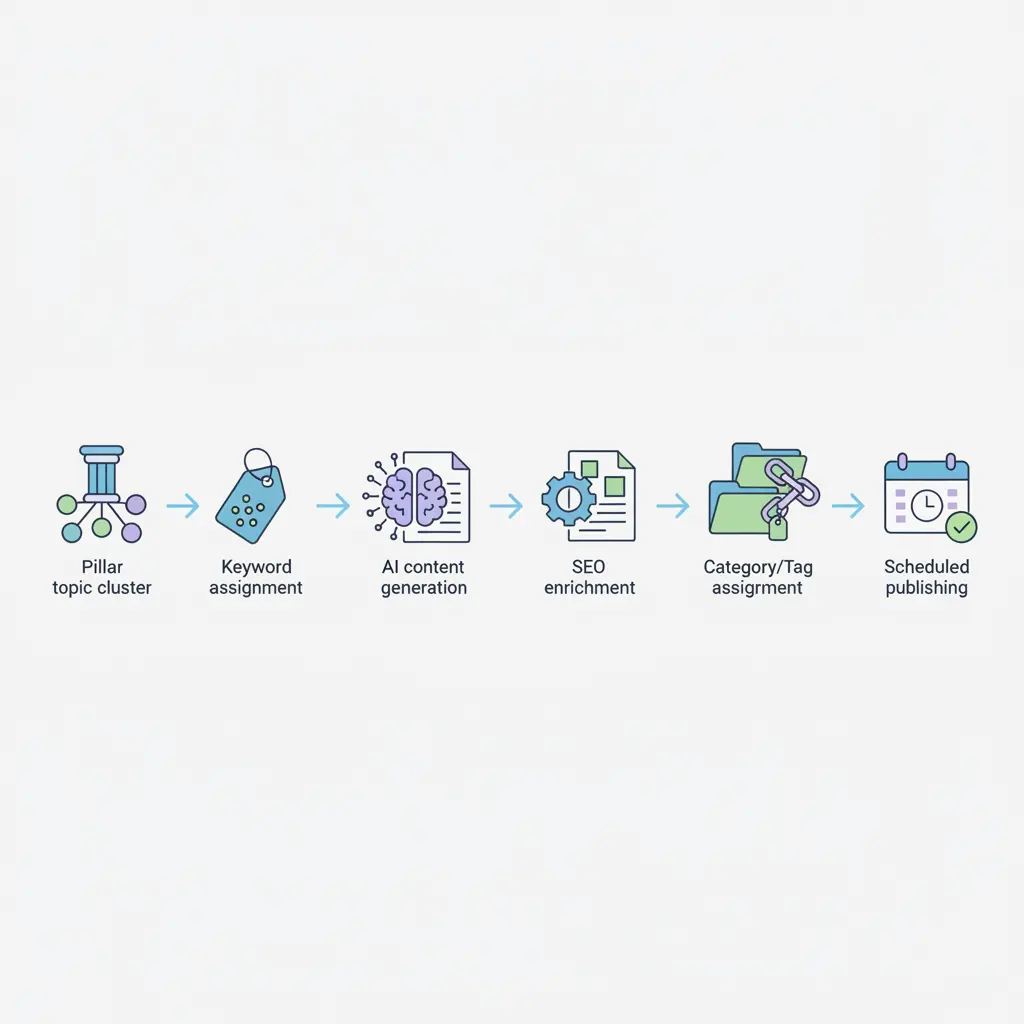
Here’s the architecture that actually works at scale:
- Topic Cluster Definition — Before any AI writes a word, you need a topic map. Define your pillar topic and 10-20 supporting subtopics. This is where pillar-cluster architecture becomes non-negotiable. Automated posts that don’t belong to a cluster create topical noise, not topical authority.
- Keyword Assignment Per Post — Each post in the batch gets a primary keyword, 2-3 secondary keywords, and a target search intent label (informational, navigational, commercial). Feed this into your AI generation prompt.
- AI Content Generation — Use an AI platform with WordPress integration. The prompt should include the keyword, search intent, target word count, required H2 structure, and instructions for internal linking placeholders.
- SEO Enrichment Pass — After generation, the content pipeline should automatically attach: meta title, meta description, focus keyword for Yoast/RankMath, Open Graph tags, and schema type (Article, HowTo, FAQ, etc.).
- Internal Link Injection — The pipeline should scan existing published posts and inject contextually relevant internal links. This is the step most manual workflows skip — and it’s where topical authority signals actually get built.
- Category/Tag Assignment — Map each post to the correct WordPress taxonomy automatically based on topic cluster assignment.
- Scheduled Publishing — Spread posts across the 7 days at consistent intervals. Don’t dump 10 posts in 24 hours — it looks unnatural in crawl logs.
For teams comfortable with no-code tools, WordPress + YouTube integrations via Zapier can also automatically convert video transcripts into blog posts — a legitimate way to repurpose high-value video content into SEO-optimized articles at zero extra writing effort. WPBeginner has a solid tutorial on the exact setup.
Schema Markup at Scale: Automating Structured Data
Schema markup is where most automated content pipelines fall apart. Generating text at scale is easy. Generating schema-correct structured data for every post — Article type, author entity, datePublished, FAQ blocks, HowTo steps — is the hard part.
Why does this matter? Google’s March 2024 core update explicitly targeted AI-generated content that lacked clear authorship, expertise signals, and structured markup. Schema isn’t optional for automated content — it’s the signal that tells Google “this is a legitimate, structured resource, not spam.”
Here’s what your automation pipeline needs to output per post:
- Article schema — headline, datePublished, dateModified, author (with sameAs pointing to an About page), publisher
- BreadcrumbList schema — automatically generated from WordPress category hierarchy
- FAQPage schema — if the post includes a FAQ section (it should)
- HowTo schema — for tutorial-style posts with numbered steps
Fair warning: manually adding JSON-LD schema to 10 posts in 7 days is a full-time job. This is exactly where automation earns its keep — any AI pipeline worth deploying should handle schema generation as part of the publish step, not as an afterthought.
For deeper context on building AI workflows that include governance and schema best practices, the complete AI-powered SEO content strategy guide for 2026 covers prompt engineering and output validation in detail.
7-Day Automated Publishing Sprint: Step-by-Step Plan
This is the blueprint most “content automation” posts never give you. A real 7-day sprint isn’t just “write more posts.” It’s a structured execution plan.
Days 1-2: Strategy and Setup
- Define 1 pillar topic and map 10 cluster subtopics (use Google’s “People Also Ask,” Ahrefs, or Semrush)
- Assign primary + secondary keywords per post
- Install and configure your automation pipeline (plugin + AI platform)
- Set up your publishing schedule: 1-2 posts per day, consistent times
Days 3-5: Generate and Validate
- Generate all 10 posts through your AI pipeline
- Run a spot-check on 3-4 posts for factual accuracy, tone, and on-page SEO
- Verify schema output using Google’s Rich Results Test
- Confirm internal links are injected correctly across the batch
Days 6-7: Publish and Monitor
- Begin scheduled publishing — don’t front-load. Spread evenly.
- Submit updated sitemap to Google Search Console
- Monitor crawl stats in GSC for the first 48 hours
- Set up rank tracking for each post’s primary keyword
How Authenova Handles the Entire Pipeline
After walking through all the moving parts above — topic mapping, AI generation, schema markup, internal linking, scheduling — you can see why most WordPress users who try to build this pipeline manually abandon it within two weeks. The number of tools, the API connections, the schema validation steps — it adds up fast.
The Authenova WordPress Plugin was built to solve exactly this problem. Install it, activate it, and it connects your WordPress site to the Authenova platform in one step. From there, the platform handles the full automated WordPress content publishing pipeline:
- Extracts your site data — pages, categories, tags, metadata, sitemaps — so every generated post fits your existing taxonomy
- Receives AI-generated content from the platform and pushes it directly into WordPress with all SEO metadata attached
- Adds schema markup automatically — Article, FAQ, HowTo, BreadcrumbList — no JSON-LD editing required
- Injects internal links based on topical relevance across your existing content
- Updates your sitemap after every publish event
The result: your 7-day publishing sprint runs on autopilot once the topic strategy is set. You define the cluster, Authenova generates and publishes the posts with full SEO infrastructure — structured data, meta tags, internal linking, proper categorization — all baked in.
This isn’t about removing humans from the equation. It’s about removing the repetitive infrastructure work from the equation so you can focus on strategy and quality oversight. Spot-check the content, validate the schema, monitor GSC — that’s the human work that actually matters.
FAQ: Automated WordPress Content Publishing
Does automated WordPress content publishing hurt SEO?
Automation itself doesn’t hurt SEO — thin, irrelevant, or duplicate content does. Google’s March 2024 spam policies target low-quality AI content, not AI content as a category. Automated posts that are topically focused, properly structured with schema markup, and genuinely useful for readers perform the same as manually written posts — often better because they’re published more consistently with correct SEO infrastructure attached.
What’s the best plugin for automated WordPress SEO content?
For end-to-end automation (content generation, schema, internal linking, scheduling), the Authenova WordPress Plugin combined with the Authenova platform is the most complete solution available. For partial automation (schema and meta only), Yoast SEO or RankMath handle the structured data layer well. For scheduling alone, WP Scheduled Posts is reliable and lightweight.
How many posts should I publish per day for SEO without triggering spam flags?
There’s no official Google limit on publishing frequency — quality and relevance are the key signals, not volume. Practically, 2-3 topically related posts per day is a safe rate for most sites during a content sprint. Avoid publishing more than 5 posts in a single day, especially for newer domains, as sudden crawl spikes can delay indexation. Spread publishing across the day rather than batch-uploading at midnight.
Does schema markup need to be added manually to each automated post?
Not if your automation pipeline handles it. Tools like Yoast SEO auto-generate Article and BreadcrumbList schema for every post. For more specific types — FAQPage, HowTo, Product — you either need a plugin that handles those types automatically (Rank Math does this well) or an AI platform like Authenova that generates the correct JSON-LD as part of the content creation step.
Can I automate internal linking in WordPress?
Yes. Plugins like Link Whisper use NLP to suggest and inject internal links automatically based on content relevance. Dedicated content automation platforms like Authenova go further — they analyze your entire site’s existing content and inject contextually correct internal links before a post is even published. This is one of the highest-value automation steps for building topical authority signals.
Ready to Run Your 7-Day Publishing Sprint?
The framework is here. The tools exist. The only thing missing is the pipeline that connects them.
Start with the AI workflows and automation strategies in the complete AI-powered SEO content strategy guide, and use the pillar-cluster architecture guide to structure your 10-post sprint for maximum topical authority.
Try Authenova Free — No Credit Card Required
Connect your WordPress site, set your strategy, and let AI handle the automated content publishing pipeline.
Article reviewed and updated for 2025. Statistics reference Ahrefs’ 2024 AI content study and Google’s March 2024 core update documentation.