WordPress Content Automation: The 2026 Complete Setup Guide
WordPress content automation has gone from a niche tactic used by affiliate bloggers to the standard operating procedure for every serious content team in 2026. The sites outranking you aren’t working harder — they’re automating smarter. They’ve connected AI writing tools, WordPress plugins, and scheduling systems into a pipeline that publishes consistent, high-quality content at a velocity no manual team can match.
This guide is your complete blueprint. We’ll cover every component of a working WordPress content automation stack — from AI content generation to scheduled publishing, SEO metadata injection, and performance tracking — with real configuration examples and plugin recommendations.
By the end, you’ll have everything you need to set up a content engine that publishes while you sleep.
Why WordPress Content Automation in 2026
The economics of content creation have fundamentally shifted. Five years ago, a 2,000-word SEO article took a skilled writer 4-6 hours and cost $150-$400. Today, AI tools produce the same caliber article in minutes. Sites that don’t automate their content production are paying a 10-20x cost premium — and publishing 5-10x fewer articles — compared to competitors running automated pipelines.
The result is predictable: slower topical authority growth, lower organic traffic ceilings, and a widening competitive gap that becomes harder to close every month.
But automation isn’t just about cost and speed. It’s about consistency. Google rewards sites that publish on predictable schedules. A site publishing 3 high-quality articles every Tuesday and Thursday accumulates authority faster than a site publishing 10 articles one week and zero the next. Automation enforces the consistency that manual teams struggle to maintain.
What Automation Handles vs. What Humans Handle
Automation Handles:
- Article structure and formatting
- Keyword integration and density
- Meta titles and descriptions
- Schema markup generation
- Publishing and scheduling
- Featured image generation
- Internal link suggestions
- Sitemap updates
Humans Handle:
- Content strategy and keyword research
- Brand voice guidelines
- Editorial calendar decisions
- Expert quotes and original research
- Final quality review (optional)
- Link building outreach
- Performance analysis and pivots
The Complete Automation Stack
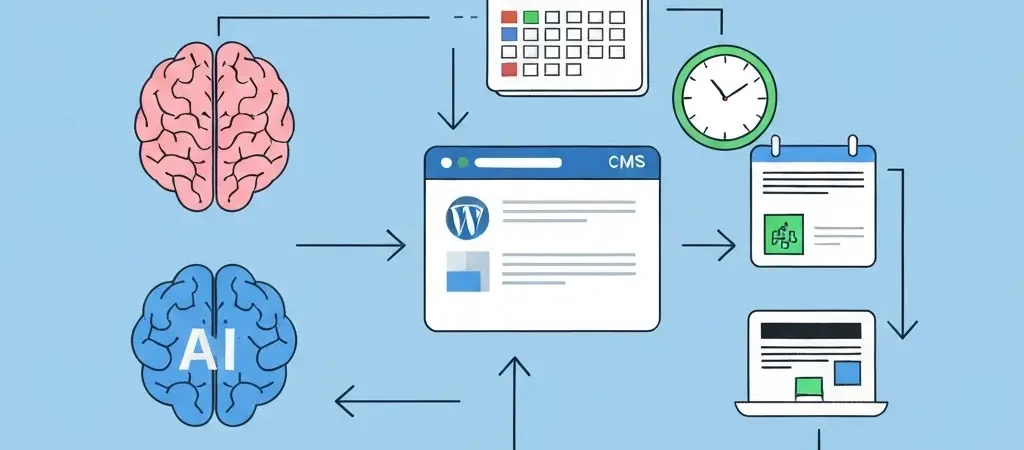
A fully automated WordPress content system has four layers:
Layer 1: Content Strategy Platform
This is where you define what gets written and when. You need a system that tracks keywords, organizes content clusters, manages editorial calendars, and feeds instructions to your AI content generator. Authenova fills this role — it’s your strategic command center.
Layer 2: AI Content Generator
The engine that actually writes articles from your keyword and strategy inputs. Quality here depends on how well your strategy is defined — garbage in, garbage out. The best AI content generators in 2026 produce structured HTML with proper heading hierarchy, FAQ sections, internal link placeholders, and SEO metadata. Authenova’s AI generation handles all of this.
Layer 3: WordPress Publishing Plugin
The bridge between your content platform and WordPress. This plugin receives article content via REST API or webhook and creates/updates WordPress posts with all metadata, tags, categories, featured images, and schema markup. The Authenova WordPress Plugin is purpose-built for this role.
Layer 4: Performance Tracking
Closing the loop — ranking data, traffic, and engagement metrics feed back into your content strategy to tell you what’s working and where to double down. Google Search Console plus your Authenova analytics dashboard gives you this feedback loop without additional tools.
Setting Up Authenova for WordPress Automation
Here’s the step-by-step setup for a complete Authenova WordPress content automation system:
Step 1: Create Your Website in Authenova
- Log into authenova.site and go to Websites → Add Website
- Enter your WordPress site URL and name
- Copy the webhook URL from your Website settings
Step 2: Install the WordPress Plugin
// Installation via WordPress Dashboard:
1. Plugins → Add New → Upload Plugin
2. Upload authenova-plugin.zip
3. Activate Plugin
4. Settings → Authenova → Enter API Key
5. Test Connection → "Ping Successful" confirms setup
Step 3: Build Your Content Strategy
In Authenova, create a Strategy with:
- Target keywords: Your primary, secondary, and supporting keyword list
- Content types: Define your PILLAR : CLUSTER : SUPPORTING ratio (typically 3:4:3)
- Publishing schedule: Which days and times, how many articles per day
- Brand voice: Tone, style, audience description, writing guidelines
- Products: Any products or services to feature in CTAs
Step 4: Configure Auto-Publishing
Set your Strategy’s workflow mode to AUTO_PUBLISH or SCHEDULED. AUTO_PUBLISH pushes articles live as soon as they’re generated. SCHEDULED queues them for your specified publish windows — the safer option for most teams.
// Recommended schedule configuration for content sites:
publishDays: [2, 4]  // Tuesday and Thursday
publishTimes: ["11:00"]
articlesPerDay: 3-5
timezone: "Europe/London"  // or your local timezone
Step 5: Monitor and Iterate
Check your Authenova dashboard weekly. Review:
- Content generation success rate (should be 95%+)
- WordPress publishing success rate (should be 100%)
- Ranking progress for target keywords in GSC
- Organic traffic trends by article cluster
Content Scheduling: How to Plan a 90-Day Calendar
Effective content automation isn’t random article generation — it’s a deliberate sequence of content that builds topical authority systematically. Here’s the 90-day framework used by high-performance content sites:
Days 1-30: Establish the Foundation
Publish your PILLAR articles first. These are your 2,000-3,000 word comprehensive guides for each major topic cluster. They become the hub that all CLUSTER and SUPPORTING articles link to. Without these in place, your cluster content has nowhere to funnel link equity.
Days 31-60: Build the Clusters
Publish 3-5 CLUSTER articles for each PILLAR. These are 1,200-1,800 word articles targeting secondary and long-tail keywords within each topic. Each one links back to its PILLAR page, creating the foundational internal linking structure.
Days 61-90: Add Supporting Content
Fill in with SUPPORTING articles — shorter 800-1,200 word pieces targeting very specific long-tail queries. These often capture featured snippet traffic and provide additional internal linking signals.
By day 90, you have a complete topical authority structure that Google can understand and reward. This is exactly the framework Authenova’s Strategy Builder enforces — it maintains the PILLAR → CLUSTER → SUPPORTING hierarchy automatically.
Automating SEO Metadata and Schema
Manual SEO metadata entry is one of the most error-prone steps in content publishing. Automation eliminates these errors and ensures every article is fully optimized from the moment it’s published:
Meta Title and Description Generation
Authenova generates meta titles and descriptions optimized for the focus keyword and character limits (under 60 and 160 characters respectively) as part of the article creation process. No manual entry required.
Focus Keyword and OG Tag Injection
The WordPress Plugin sets rank_math_focus_keyword or Yoast’s _yoast_wpseo_focuskw meta field automatically, along with Open Graph title, description, and image for social sharing.
Automatic Schema Markup
Article schema, FAQPage schema, and BreadcrumbList schema are generated and injected for every published article. See our detailed schema markup generator guide for how this works in depth.
Quality Control in Automated Content Workflows
The biggest objection to content automation is quality. “Won’t the AI produce generic, low-quality content?” The answer depends entirely on how you configure your system. Here’s how to maintain quality at scale:
Brand Voice Guardrails
Your Strategy’s brand voice description is the most important quality control lever. Be specific: “Write like a senior software engineer explaining concepts to a non-technical audience. Use analogies, avoid jargon, include code examples where helpful.” Vague brand voice = generic content.
Keyword Integration Rules
Set explicit keyword density targets (1-2%) and instruct the AI to use keyword variants and related terms naturally. Articles that keyword-stuff or underuse their focus keyword both underperform.
DRAFT-First Workflow
For high-stakes content, use DRAFT_ONLY mode. Articles are generated and saved as drafts for editorial review before publishing. A single editor can review 10-15 AI-generated articles per hour — dramatically faster than writing from scratch, while maintaining human quality control.
Scaling to 50+ Articles Per Week
Once your automation stack is working at 5-10 articles per week, scaling to 50+ is primarily about two things: keyword library depth and strategy segmentation.
Keyword Library Depth
A 50-article-per-week operation needs 500+ keywords in its library (assuming a typical article reuse rate). Authenova’s keyword management system lets you import bulk keyword lists and assign them to strategies automatically.
Strategy Segmentation
Instead of one strategy covering your entire site, break into topic-specific strategies. A content marketing site might have separate strategies for “WordPress SEO,” “Content Strategy,” “Link Building,” and “Technical SEO” — each with its own keyword cluster, brand voice nuance, and publishing schedule.
This is how sites like Tesify use Authenova to publish at scale across multiple languages simultaneously — separate strategies for French, Spanish, Portuguese, German, and English content, each targeting language-specific keywords and audiences. For example, Tesify’s German platform runs a completely independent content strategy optimized for German academic search queries.
Marketing agencies can leverage CampaignOS alongside Authenova to manage multi-client, multi-site automation campaigns from a single dashboard.
Frequently Asked Questions
Is WordPress content automation safe for SEO?
Yes, when done correctly. Google’s guidelines focus on content quality and user value — not how the content was produced. AI-generated content that is helpful, accurate, and well-structured ranks as well as human-written content. The risks come from low-quality, thin, or spammy automated content. A well-configured automation system like Authenova produces content that meets Google’s quality standards.
How much does WordPress content automation cost?
Authenova’s WordPress content automation starts at a fraction of the cost of manual content production. At 20+ articles per month, automation typically costs 80-90% less than hiring freelance writers. The Authenova WordPress Plugin is included with your Authenova subscription. See authenova.site for current pricing.
Can I review articles before they’re published automatically?
Yes. Set your Authenova strategy to DRAFT_ONLY mode and articles are saved as WordPress drafts for editorial review before publishing. You can also use SCHEDULED mode to queue articles for future publication dates, giving you a review window before they go live.
What’s the difference between auto-blogging and content automation?
Auto-blogging typically refers to scraping or reposting content from RSS feeds — this is against Google’s guidelines and can result in penalties. Content automation, as used by Authenova, means generating original, unique AI-written content based on your keyword strategy and brand guidelines. The content is original, not copied, and designed to rank for specific search queries.
How long until automated content starts ranking?
Timelines vary by domain authority and keyword competition, but most sites see initial rankings within 6-12 weeks of consistent automated publishing. Lower-competition long-tail keywords can rank within 2-4 weeks. The key is publishing consistently — Google rewards sites with regular new content. A 90-day automation program typically produces measurable organic traffic growth by month three.
Start Automating Your WordPress Content Today
Set up your first automated content strategy in under 30 minutes. Authenova handles the writing, scheduling, SEO metadata, and WordPress publishing — you focus on strategy.