WordPress SEO & Automated Content Publishing: How to Publish 9 Posts in 7 Days
Most WordPress site owners spend 6–8 hours writing a single blog post. Research, outline, draft, optimize, format, publish — and that’s before you touch the meta description. At that pace, nine SEO-optimized posts per week is a fever dream, not a content strategy.
Here’s the thing: it doesn’t have to be. The bottleneck isn’t your writing speed — it’s your workflow. With the right combination of WordPress SEO tools, AI-assisted drafting, and automated content publishing, teams are consistently hitting 9 published posts in 7 days without sacrificing quality or search visibility.
This article breaks down exactly how to build that system, step by step.
Why 9 Posts in 7 Days Is the Right Content Velocity Target
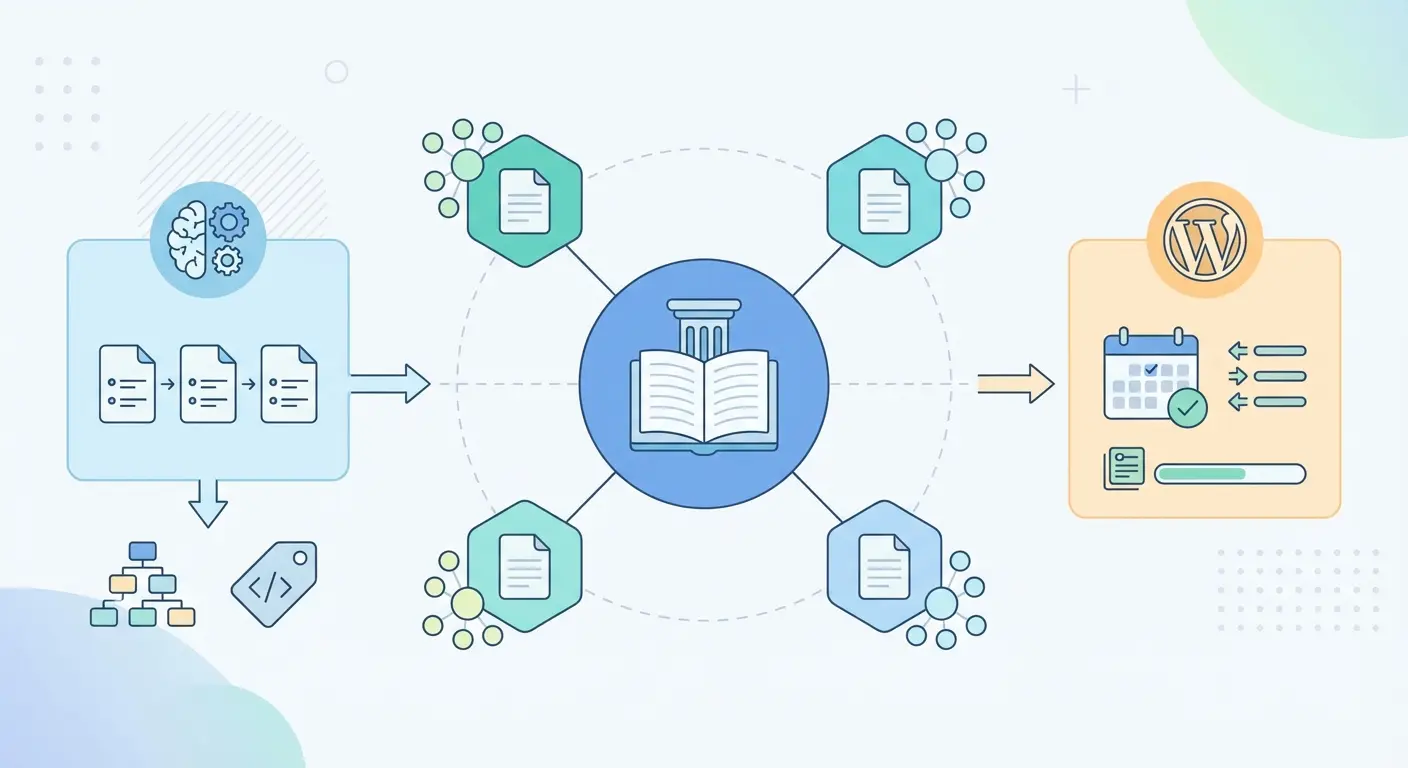
Nine posts in seven days isn’t an arbitrary number — it maps directly to a full content cluster. One pillar article, seven supporting cluster posts, and one cornerstone comparison or roundup piece. That’s a complete topical authority unit deployed in a single week.
Google’s systems have been increasingly rewarding sites that demonstrate topical depth, not just individual keyword rankings. A Semrush analysis found that sites publishing 11–16 posts per month received 3.5x more traffic than those publishing 0–4. The math is unforgiving: if you’re writing one post a week, you’re not building topical authority fast enough to compete.
What most people miss is that the bottleneck isn’t content quality — it’s workflow fragmentation. Writers, SEO analysts, editors, and WordPress admins working in silos kill velocity. When your content system is integrated, that 9-post week becomes repeatable.
The sites winning at content velocity right now aren’t just publishing more — they’re publishing smarter, with tighter keyword targeting, stronger internal linking, and schema markup baked in from day one. That’s exactly what this WordPress SEO and automated content publishing workflow is designed to do.
Planning Your Content Cluster Before You Write Word One
The fastest way to waste a week of automated publishing is skipping the architecture phase. Before any AI tool generates a single word, you need a cluster map.
A cluster map defines:
- Your pillar page (the broad, high-volume topic hub)
- Your cluster posts (specific subtopics that link back to the pillar)
- Your supporting posts (narrow long-tail questions and comparisons)
- The internal link structure connecting all of them
For a 9-post week, a practical breakdown looks like this:
| Post Type | Count | Word Count Target | Publishing Day |
|---|---|---|---|
| Pillar Page | 1 | 3,000–4,000 words | Day 1 |
| Cluster Posts | 5 | 1,500–2,500 words | Days 2–5 |
| Supporting Posts | 2 | 800–1,200 words | Days 5–6 |
| Comparison/Roundup | 1 | 1,800–2,500 words | Day 7 |
The pillar goes live first so that every cluster post published afterward can link back to it — immediately building internal authority signals from day one. This is the structural insight that most rapid-publishing attempts get wrong.
For a deeper look at how pillar-cluster architecture works as a long-term SEO strategy, see Pillar-Cluster Content Strategy: Architecture for Topical Authority — it covers the full structural framework in detail.
Fast-Track Keyword Research for Automated Content Workflows
Here’s where most automated content workflows fall apart: they generate content first and research keywords second (or not at all). That’s backwards.
For a 9-post cluster, you need exactly 9 focused keyword briefs before anything gets written. Each brief should contain:
- Primary keyword — the exact phrase this post targets
- Search intent — informational, navigational, commercial, or transactional
- Target word count — based on competing SERP results
- 3–5 secondary keywords — related terms, LSI phrases, entity synonyms
- Questions to answer — pulled from People Also Ask and forum threads
- Internal link targets — which other cluster posts it should link to
For speed, use a combination of free and paid tools. Google Search Console shows you which queries you’re already appearing for — good for expansion topics. Ahrefs or Semrush surfaces keyword difficulty and volume. For free alternatives, Google’s autocomplete and the “People also ask” box work surprisingly well as first-pass research.
The thing that clicked for me when building high-velocity content pipelines: long-tail keywords are your best friend. A cluster of 9 posts targeting high-volume, competitive keywords will rank nowhere fast. Nine posts targeting long-tail variations of a core topic? You can be on page one within weeks, not months.
The Long-Tail Keyword Strategy guide covers exactly how to build a keyword funnel that fills your content calendar with high-intent topics — worth reading before you lock in your 9 briefs.
AI Content Generation for WordPress SEO Posts
AI content generation for WordPress SEO has matured significantly since the ChatGPT explosion of 2023. The tools available now — when used correctly — can produce structured, readable drafts that are genuinely useful to readers.
The operative phrase is when used correctly.
Raw AI output dumped into WordPress isn’t a content strategy — it’s a liability. What actually works is a brief-driven, structured generation approach where the AI fills a pre-defined template rather than free-writing from a vague prompt.
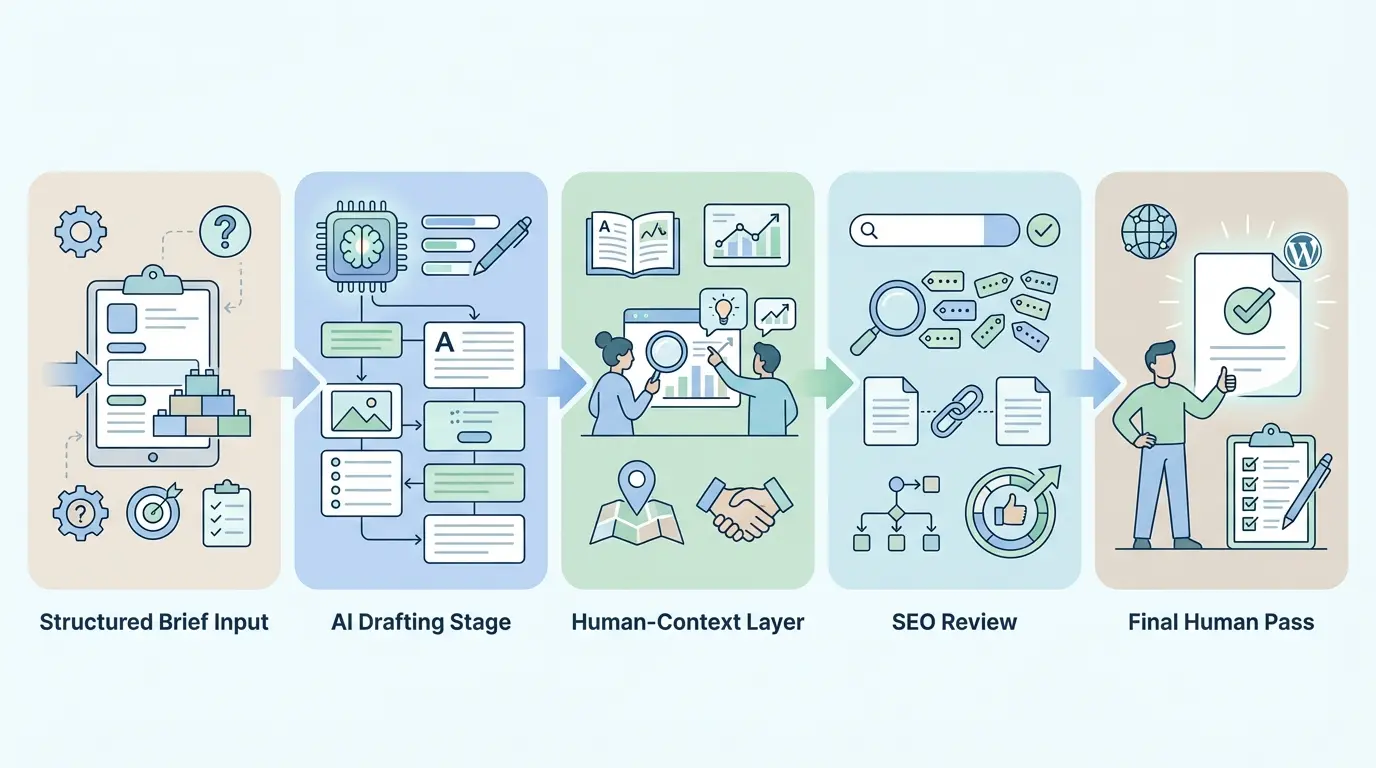
A Practical AI Content Generation Process
- Start with a structured brief — Include primary keyword, intent, target audience, word count, heading structure, and questions to answer
- Generate section by section — Don’t ask for a 2,000-word post in one shot; generate H2 sections individually for better quality control
- Add human context — Inject real examples, current data points, and first-hand observations before publishing
- Run through SEO review — Check keyword density, heading hierarchy, meta description, and internal link targets
- Final human pass — A 10-minute read-through to catch anything that sounds robotic or factually thin
For teams who want to automate this beyond prompt-and-paste, tools like n8n’s OpenAI + WordPress automation workflow or Zapier’s AI-to-WordPress scheduling pipeline offer no-code approaches that connect AI generation to WordPress publishing automatically.
The real efficiency gain comes when brief creation, generation, SEO optimization, and publishing are all handled by a single integrated system — which brings us to the tool that makes this practical at scale.
How the Authenova Plugin Automates the Entire Pipeline
The biggest friction point in any WordPress SEO automation workflow is the handoff between your content generation tool and WordPress itself. Formatting breaks. Meta tags get lost. Images need alt text. Internal links require manual insertion. Categories need setting. It eats hours.
The Authenova WordPress Plugin is built specifically to eliminate that handoff entirely.
Here’s how it works in practice:
- Install and activate the plugin from your WordPress dashboard — one-click connection to the Authenova platform
- The plugin syncs your site data — pages, categories, tags, existing content metadata, sitemaps, and product info
- Define your content strategy on the Authenova platform — topic clusters, target keywords, publishing schedule, and brand voice guidelines
- Authenova’s AI generates fully structured, SEO-optimized drafts mapped to your keyword briefs
- Content is published automatically to WordPress with schema markup, meta tags, internal links, proper categories, and sitemap updates already applied
- SEO title and meta description generation
- Schema markup (Article, FAQ, HowTo as applicable)
- Internal linking to existing cluster posts
- Category and tag assignment
- Sitemap update trigger
- Scheduled publish time
For a 9-post cluster week, this means you can configure the entire publishing schedule on Monday morning — keyword briefs, cluster architecture, and publish times — and have all 9 posts live by Sunday without touching WordPress again.
The platform also builds topical authority intentionally, following the pillar-cluster framework so that your automated content isn’t just a pile of disconnected articles — it’s a structured SEO asset. You can install the Authenova WordPress plugin and connect your site in under five minutes.
For context on why this kind of AI-driven workflow represents the current direction of content strategy, the Complete Guide to AI-Powered SEO Content Strategy covers the broader framework — including content velocity, automation architecture, and quality benchmarks.
Automating On-Page SEO at the Point of Publishing
Publishing fast is pointless if every post lands without proper on-page SEO. The goal of automation isn’t to skip optimization — it’s to make optimization happen automatically at publish time.
Here’s what needs to be configured or automated for every post in your 9-post week:
On-Page SEO Checklist for Automated WordPress Publishing
- ✅ Title tag — Primary keyword in first 3 words, under 60 characters
- ✅ Meta description — 150–160 characters, includes primary keyword, written to earn clicks
- ✅ URL slug — Short, keyword-focused, no stop words (see Yoast’s guidance on URL structure and rankings)
- ✅ H1 contains primary keyword — Once, naturally, in the first 3 words
- ✅ First 100 words include primary keyword — Naturally, not forced
- ✅ Internal links — 3–5 links to related cluster posts with descriptive anchor text
- ✅ Image alt text — Every image gets keyword-contextual alt attributes
- ✅ Schema markup — Article schema minimum; FAQ schema where applicable
- ✅ Category assignment — Maps to your cluster topic architecture
- ✅ XML sitemap — Updated automatically post-publish
If you’re using Yoast SEO or Rank Math, much of this can be templated. Yoast’s WordPress SEO definitive guide covers the configuration options in depth. The WPBeginner 13-point WordPress SEO checklist is also a solid reference for ensuring nothing gets missed at launch.
The counterintuitive insight here: automating SEO metadata is safer than doing it manually when you’re publishing at volume. Humans get tired and skip fields. Systems don’t.
The 7-Day Publishing Schedule (With Templates)
Theory is fine. A day-by-day schedule you can actually copy is better. Here’s a production-tested 7-day workflow for a 9-post WordPress SEO cluster.
Day-by-Day Production Timeline
Day 1 — Architecture & Briefs
Create your cluster map. Define all 9 keyword briefs. Set up categories and tags in WordPress. Configure your Authenova campaign or manual publishing schedule.
Day 2 — Pillar Post Live
Publish the pillar page first. It becomes the internal link destination for every subsequent post. Minimum 3,000 words. Full SEO optimization. Schema markup applied.
Day 3 — Cluster Post 1 & 2
Publish the first two cluster articles. Each links back to the pillar and cross-links to each other where relevant. Trigger indexing via Google Search Console.
Day 4 — Cluster Post 3 & 4
Same process. By now your internal link graph is taking shape. Check that all link anchor text is descriptive and keyword-relevant.
Day 5 — Cluster Post 5 + Supporting Post 1
The fifth cluster article completes your core coverage of the topic. Supporting post 1 targets a specific long-tail question or comparison angle.
Day 6 — Supporting Post 2
Second supporting post. These shorter pieces (800–1,200 words) often rank faster than longer cluster content because they target lower-competition long-tail queries.
Day 7 — Comparison or Roundup Post
The comparison or roundup post ties everything together. It links to all major cluster posts and often earns backlinks because it’s genuinely useful as a reference resource. Publish, then do a full internal link audit across all 9 posts.
Quality Control: Keeping AI Content Google-Safe
This is where you either build a sustainable SEO asset or walk into a penalty. Google’s March 2024 core update made it unambiguous: scaled content abuse — publishing large volumes of AI-generated content that provides no real value — is a manual action trigger.
Fair warning: this takes effort, but it’s the difference between ranking and getting de-indexed.
Non-Negotiable Quality Gates Before Publishing
- Fact-check every statistic — AI hallucinates data. Verify every number against a primary source before it goes live.
- Add genuine expertise signals — Include at least one original insight, first-hand example, or practitioner observation per post that couldn’t have been AI-generated.
- Check for content coherence — Does the post actually answer the search intent? Could a real person find value in it? If no, don’t publish.
- De-duplicate internally — Don’t publish two posts targeting the same keyword from different angles. Pick one; make it excellent.
- Review E-E-A-T signals — Author byline, publication date, relevant credentials, and outbound citations to authoritative sources.
The sites that got hit hardest in 2024’s core updates weren’t using AI — they were using AI without human review. A 15-minute quality pass per post before it publishes is the difference between a content asset and a ranking liability.
What most people miss in the quality debate: Google’s systems are primarily looking at whether content satisfies the searcher. If your AI-generated post answers the question better than anything else on the SERP, it will rank — regardless of how it was produced. The bar is helpfulness, not human authorship.
Frequently Asked Questions
Can you really publish 9 SEO-optimized WordPress posts in 7 days without sacrificing quality?
Yes — but only with a structured system. The key is completing all keyword research and editorial briefs before generation starts, using AI to draft structured content within a defined template, and automating SEO metadata and publishing. Tools like Authenova handle the generation-to-publish pipeline automatically. Human review remains essential: expect 10–15 minutes of editing per post to ensure factual accuracy and genuine value.
What’s the difference between automated content publishing and content spam?
Content spam is low-quality AI output published at scale with no editorial oversight, targeting rankings rather than readers. Automated content publishing — done correctly — uses AI to accelerate structured, brief-driven drafts that are human-reviewed before going live. Google’s own guidance focuses on whether content provides genuine value to users, not on how it was produced. The distinction is quality and intent, not the tools used.
Which WordPress plugins are best for automating SEO metadata on published posts?
Yoast SEO and Rank Math are the two dominant options for on-page SEO metadata in WordPress. Both allow you to set title tag templates, auto-generate meta descriptions from content, and configure schema markup. For full pipeline automation — including content generation, internal linking, and scheduled publishing — Authenova’s WordPress plugin extends these capabilities by handling the entire workflow from brief to live post.
How long does it take for automated WordPress posts to start ranking on Google?
For newer sites, expect 3–6 months before significant organic traffic from a new content cluster. For established domains with existing authority, well-structured cluster content targeting long-tail keywords can appear on page one within 2–6 weeks. Submitting posts to Google Search Console immediately after publishing and building internal links from day one both accelerate indexing and ranking timelines.
Does publishing many posts at once hurt SEO?
Publishing all posts simultaneously can appear as a content dump, which some SEOs believe signals low-quality or spammy behavior to crawlers. Spreading 9 posts across 7 days mimics the pattern of a consistently active content operation, which is a positive trust signal. Scheduled publishing — one or two posts per day — is the recommended approach for both crawlability and audience engagement.
What’s the minimum word count for a WordPress post to rank well?
There’s no universal minimum — the right word count is whatever it takes to fully satisfy the search intent for a given query. Pillar pages typically need 2,500–4,000 words. Cluster posts perform well at 1,500–2,500 words. Supporting posts targeting specific long-tail questions can rank effectively at 800–1,200 words if the content is direct, accurate, and more useful than competing results.
Keep Building Your WordPress SEO System
Publishing 9 posts in 7 days is one week of execution. The sites that compound organic traffic month after month are the ones with a repeatable system behind every cluster they publish. WordPress SEO and automated content publishing aren’t shortcuts — they’re infrastructure.
Here’s where to go from here:
- 📖 Read the complete AI-Powered SEO Content Strategy guide for the full framework behind automated content that ranks
- 🏗️ Study the Pillar-Cluster Architecture guide to plan your next cluster before you generate a single word
- 🔍 Explore the Long-Tail Keyword Strategy guide to fill your content calendar with high-intent, rankable topics
And if you’re ready to run the 9-post workflow on autopilot — from keyword brief to live, optimized post — try Authenova free (no credit card required). Connect your WordPress site in under five minutes and see what a fully automated content pipeline looks like in practice.