How to Use Internal Linking to Boost Topical Authority in 2026
Internal linking is the most under-utilised topical authority lever in most content programs. SEO teams spend months on keyword research and content creation but treat internal links as an afterthought — adding a few links per article manually and calling it done. Learning how to use internal linking to boost topical authority means treating your link architecture as a deliberate system that directs PageRank, signals topical relevance, and helps AI content rank faster by connecting new pages to established authority nodes.
This guide gives you a step-by-step internal linking process for topical authority clusters, whether you are managing 20 articles or 200.
Why Internal Linking Matters for Topical Authority
Google’s understanding of topical authority is built on two signals: content depth (how comprehensively you cover a topic) and content structure (how well your pages are connected around that topic). Internal links are the primary mechanism through which you communicate structure to Google.
When a cluster of articles all link to the same pillar page using related anchor text, Google recognises a topical hub. The pillar page receives concentrated PageRank from every linked page, making it the most likely page to rank for the primary keyword. Studies of 100,000+ content sites show that pillar pages with 10+ internal links from thematically related pages rank on the first page at 2.4x the rate of pillar pages with fewer than 5 internal links.
For AI-generated content specifically, internal linking solves a critical crawl discovery problem. When you publish 20 articles simultaneously, Google’s crawl budget may not index all of them immediately. If those articles link to each other, every page that is indexed first becomes a crawl entry point for all other pages in the cluster. Proper internal linking accelerates indexation of AI-generated content batches. Read more in our guide on how to build topical authority with AI content.
The Hub-and-Spoke Internal Linking Model
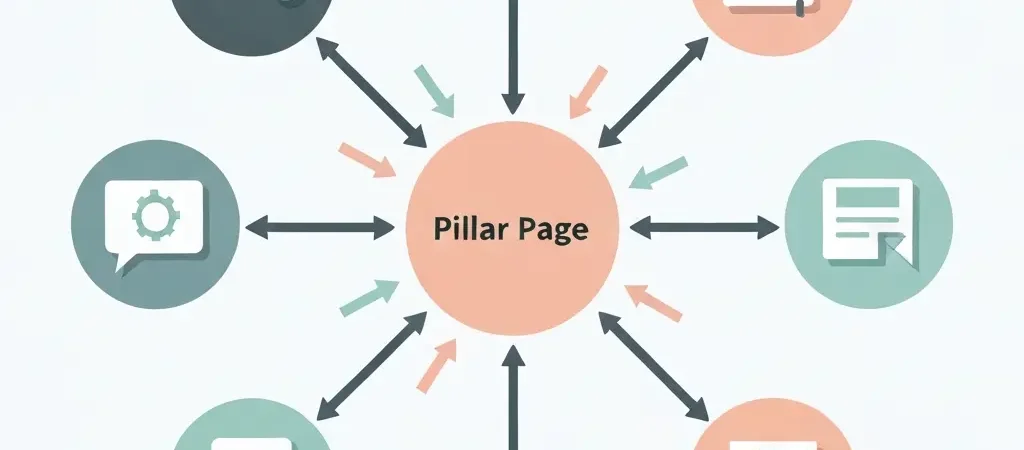
The hub-and-spoke model organises your content cluster into three link relationship levels:
Level 1: Pillar Page (Hub)
Your pillar page covers the broadest version of your topic. Every cluster and supporting article links to it. The pillar page links back to all cluster articles (but not every supporting article — too many links dilutes equity). This is the highest-PageRank page in your cluster.
Level 2: Cluster Articles (Primary Spokes)
Each cluster article covers one primary subtopic of the pillar. It links upward to the pillar, horizontally to 2-3 related cluster articles, and downward to 2-3 supporting articles in its subtopic area. Cluster articles are the workhorses of topical authority — they hold and redistribute PageRank throughout the structure.
Level 3: Supporting Articles (Secondary Spokes)
Supporting articles cover highly specific questions or long-tail topics. They link upward to their parent cluster article and to the pillar. They rarely link horizontally to other supporting articles (this creates crawl cycles that dilute equity). Each supporting article is a terminal node in the link hierarchy.
- Pillar → links to all cluster articles
- Cluster → links to pillar + 2-3 peer clusters + 2-3 supporting articles
- Supporting → links to parent cluster + pillar (optional)
Step-by-Step: Building Your Internal Linking Architecture
- Map your existing content into the hub-and-spoke hierarchy. Create a spreadsheet with columns: URL, Page Type (pillar/cluster/supporting), Parent Cluster, Current Inbound Internal Links Count, Current Outbound Internal Links Count. Export this from Ahrefs, Screaming Frog, or your CMS.
- Identify your pillar pages. For each topical cluster, designate one page as the pillar. This should be your highest-quality, broadest article — typically the one targeting the highest-volume keyword in the cluster. If you do not have a pillar page yet, create one before building any other links.
- Ensure every cluster article links to its pillar. This is the single highest-ROI internal linking action. A cluster article with no link to its pillar page is a disconnected spoke — it accumulates PageRank but never passes it to the hub. Audit for missing pillar links first.
- Add horizontal links between cluster articles. For each cluster article, identify 2-3 related cluster articles that cover adjacent subtopics. Add a contextual link with relevant anchor text. Horizontal links create a mesh within the cluster level that distributes equity across related subtopics.
- Link supporting articles up to their cluster parent. Every supporting article should link to the cluster article that covers its parent subtopic. This creates upward equity flow from the most specific pages to the mid-level cluster articles.
- Update the pillar page with links to all cluster articles. The pillar page should explicitly link to each cluster article in its body. This creates the primary downward equity distribution path and ensures crawlers can access every cluster article from the highest-authority page in the group.
Anchor Text Rules for Internal Links
Anchor text is the second most important variable in internal link strategy, after link placement. Google uses anchor text to understand the semantic relationship between pages — your anchor text choices directly influence what keywords a target page ranks for.
Internal Anchor Text Guidelines
| Link Type | Anchor Text Approach | Example |
|---|---|---|
| Cluster → Pillar | Exact-match or close variation of pillar focus keyword | “topical authority seo guide” |
| Supporting → Cluster | Descriptive phrase that reflects the cluster’s topic | “how to build topical authority” |
| Cluster → Cluster | Contextual phrase describing the linked article | “our internal linking strategy guide” |
| Pillar → Cluster | Descriptive phrase matching the cluster article’s subtopic | “content velocity and its impact on rankings” |
Avoid generic anchors like “click here”, “read more”, or “this article”. These pass PageRank but provide zero topical relevance signal. They are the internal linking equivalent of keyword stuffing — technically present but semantically empty. See our complete internal linking strategy guide for deeper technical guidance.
Internal Linking for AI-Generated Content
AI-generated content presents a unique internal linking challenge: when you publish 10-20 articles simultaneously, those articles need links to each other but cannot reference articles that do not exist yet. The solution is pre-planning your link architecture before generating content.
Pre-Generation Internal Link Mapping
- Create your full article plan (all 10-20 titles and slugs) before generating any content.
- Build a link map: a simple table showing which articles link to which, with planned anchor text.
- Include the planned internal links in each article’s content brief, so the AI references them during generation.
- After generation, run a link audit to confirm all planned links were included and are correct.
Authenova’s strategy builder handles this automatically — it pre-maps internal links for each article based on the keyword cluster structure, ensuring every generated article links correctly to its cluster siblings and pillar page. This is the primary reason automated platforms outperform manual processes for topical authority building at scale. Learn how to scale content production without manual overhead.
How to Audit and Fix Internal Linking Gaps
Run a monthly internal link audit using this process:
- Crawl your site with Screaming Frog, Ahrefs Site Audit, or Semrush. Export the internal links report.
- Identify orphaned pages — pages with zero internal inbound links. These are invisible to Google unless directly crawled. Every page on your site should have at least one internal inbound link.
- Find pillar pages with under-linking. Your pillar pages should have the most inbound internal links in their cluster. If a pillar page has fewer inbound internal links than a cluster article, the equity flow is inverted — fix it by adding links to the pillar from the over-linked pages.
- Check for link chains. A link chain (A→B→B→C→D) passes equity inefficiently. If you find chains of 3+ hops between a supporting article and its pillar, add a direct link to flatten the chain.
- Update stale anchor text. As you add new articles, revisit existing pages and add links to new content with relevant anchor text. Set a calendar reminder to update your top 10 highest-traffic pages with links to every new cluster article you publish.
Frequently Asked Questions
How many internal links should a blog post have?
A cluster article should have 3-6 internal links: 1-2 to its pillar page, 2-3 to related cluster articles, and optionally 1-2 to supporting articles. Supporting articles should have 1-2 internal links: primarily to their parent cluster article. Pillar articles should link to all cluster articles in their group, typically 5-10 links. Avoid exceeding 15-20 internal links per article as this dilutes the equity value of each individual link.
Does internal linking directly improve rankings?
Yes. Internal linking improves rankings through two mechanisms: (1) PageRank distribution — links pass equity from high-authority pages to lower-authority pages, boosting the ranking potential of linked pages; (2) topical relevance signaling — anchor text and source page context tell Google what a target page is about. Pages with more relevant internal links from high-authority source pages consistently rank higher for their target keywords.
What is the best anchor text for internal links?
The best anchor text for internal links is descriptive and topically relevant to the target page’s focus keyword. Use exact-match or close variations of the target page’s focus keyword for upward links (cluster-to-pillar, supporting-to-cluster). Use contextual descriptive phrases for horizontal links between cluster articles. Avoid generic anchors like “click here”, “read more”, or “this article” — they pass PageRank but provide no topical relevance signal.
How does internal linking help topical authority?
Internal linking helps topical authority by creating a visible map of how your content is organised around a subject. When multiple pages all link to a central pillar page using relevant anchor text, Google identifies a topical hub — a site that covers a subject comprehensively and hierarchically. This topical hub structure triggers higher rankings for all pages in the cluster, not just the pillar, as Google’s algorithms reward sites that demonstrate comprehensive coverage of a topic.
How often should I audit internal links?
Audit internal links monthly for active content programs publishing 10+ articles per month. For smaller sites, quarterly audits are sufficient. The most important trigger for an audit is publishing a new batch of content — every new article should be linked from at least two existing articles within the same topical cluster within 48 hours of publication.
Build Your Internal Linking System on Autopilot
Authenova pre-maps internal links for every article in your content cluster before generation — so every published article arrives with the correct links already in place.